Add your promotional text...

A Guide to Mobile Device Security
Protect your mobile devices from cyber threats with this ultimate guide to mobile device security. Learn best practices, tools, and step-by-step protection methods.
11/19/20259 min read

Introduction
With over 6.9 billion smartphone users worldwide and mobile devices handling everything from banking to business operations, mobile security has never been more important. According to Verizon’s 2023 Mobile Security Index, nearly 40% of organizations suffered a mobile-related breach, underscoring the growing risks associated with unprotected devices. Additionally, more than 60% of workers now use mobile devices for professional tasks, making them a primary target for cybercriminals.
A report from Check Point Research found that mobile malware attacks increased by 87% in 2022, with threats such as phishing, ransomware, and spyware becoming more sophisticated. One lesser-known risk is SIM swapping attacks, where cybercriminals hijack phone numbers to bypass authentication systems and gain access to sensitive accounts. Similarly, malicious charging stations (juice jacking) have become a growing concern, allowing attackers to steal data when users charge their devices at public USB ports.
As mobile threats evolve, businesses and individuals alike must adopt robust security strategies to safeguard sensitive information and prevent cyberattacks. Without proactive measures, mobile devices can serve as weak links, leading to data breaches, financial losses, and compliance violations.
This guide covers the best practices for mobile device security, the top tools and certifications available, and a step-by-step plan to secure your devices against modern threats.
With over 6.9 billion smartphone users worldwide and mobile devices handling everything from banking to business operations, mobile security has never been more important. According to Verizon’s 2023 Mobile Security Index, nearly 40% of organizations suffered a mobile-related breach, underscoring the growing risks associated with unprotected devices. As mobile threats evolve, businesses and individuals alike must adopt robust security strategies to safeguard sensitive information and prevent cyberattacks.
This guide covers the best practices for mobile device security, the top tools and certifications available, and a step-by-step plan to secure your devices against modern threats.
Table of Contents
What is Mobile Device Security?
Why is Mobile Device Security Important?
Best Products, Tools & Certifications for Mobile Security
How to Choose the Right Mobile Security Solution
Step-by-Step Guide to Implementing Mobile Device Security
What is Mobile Device Security?Mobile device security refers to the practices, tools, and policies used to protect smartphones, tablets, and other mobile endpoints from unauthorized access, malware, data breaches, and cyber threats. As mobile devices increasingly replace traditional computers for business and personal use, securing them has become critical to preventing cyber risks.
Why Mobile Security is Different from Traditional IT Security
Unlike desktop computers and on-premise systems, mobile devices are highly portable, frequently connected to unsecured networks, and often outside corporate security perimeters. This makes them more vulnerable to threats like:
Lost or Stolen Devices – Mobile devices are easily misplaced or stolen, potentially exposing sensitive data.
Untrusted Networks – Public Wi-Fi and shared networks increase the risk of data interception.
Malicious Apps & Software – Many mobile malware attacks stem from unverified applications.
Phishing & Social Engineering Attacks – Mobile devices are prime targets for smishing (SMS phishing) and app-based fraud.
How Mobile Device Security Works
Mobile security involves a layered approach to protect devices, users, and data. Key components include:
1. Device Protection
Encryption – Protects stored data from unauthorized access.
Lock Screens & Authentication – Uses PINs, biometrics, or multi-factor authentication (MFA) to secure access.
Remote Lock & Wipe – Enables security teams to erase data on lost or stolen devices.
2. Secure Network Access
VPNs (Virtual Private Networks) – Encrypts network traffic to prevent eavesdropping on public Wi-Fi.
Secure Wi-Fi Practices – Uses WPA3 encryption and avoids open networks.
Zero-Trust Network Access (ZTNA) – Restricts device access based on identity verification.
3. Application Security
App Whitelisting & Blacklisting – Allows only trusted applications while blocking unverified ones.
Mobile Device Management (MDM) – Enables companies to enforce security policies remotely.
Endpoint Detection & Response (EDR) – Monitors and detects abnormal mobile activity.
4. Data Protection & Compliance
Cloud Backup & Encryption – Protects stored data from loss or ransomware attacks.
Regulatory Compliance Measures – Ensures adherence to GDPR, HIPAA, and other security regulations.
Identity & Access Management (IAM) – Restricts unauthorized user access to sensitive apps and data.
Real-World Examples of Mobile Security in Action
Corporate Use: A financial firm enforces MDM policies, ensuring all employee devices use encrypted VPNs and biometric authentication for remote access.
Healthcare Protection: A hospital encrypts patient data on mobile tablets, complying with HIPAA regulations.
Personal Security: A smartphone user enables Find My iPhone and remote wipe features to protect personal data in case of theft.
With mobile threats evolving rapidly, implementing strong mobile security measures is essential for individuals and businesses to safeguard their devices and data from cyber threats.
Mobile device security refers to the practices, tools, and policies used to protect smartphones, tablets, and other mobile endpoints from unauthorized access, malware, data breaches, and cyber threats. As mobile devices increasingly replace traditional computers for business and personal use, securing them has become critical to preventing cyber risks.
Key Aspects of Mobile Device Security
Device Encryption – Protects stored data from unauthorized access.
Secure App Management – Prevents malware infiltration via untrusted apps.
Network Protection – Safeguards devices from public Wi-Fi risks.
Remote Management & Wipe – Enables organizations to secure lost or stolen devices.
Multi-Factor Authentication (MFA) – Strengthens login security beyond passwords.
Why is Mobile Device Security Important?
Mobile devices store and process sensitive personal and corporate data, making them prime targets for cybercriminals. A lack of security can lead to data breaches, financial losses, and identity theft. The increasing reliance on mobile devices for work, banking, and personal communication has made mobile security a critical concern for both individuals and businesses.
1. Rising Cyber Threats to Mobile Devices
Mobile malware infections increased by 500% in 2022, according to Kaspersky, with attacks targeting Android and iOS devices.
Phishing attacks on mobile devices have doubled, especially through SMS-based scams (smishing) and malicious applications.
Unsecured public Wi-Fi connections expose users to data interception, enabling attackers to steal sensitive information such as login credentials and financial details.
2. Real-World Examples of Mobile Security Failures
Pegasus Spyware (2021): An advanced spyware exploited mobile device vulnerabilities to infiltrate high-profile targets, including journalists and government officials.
WhatsApp Data Leak (2019): A critical security flaw allowed attackers to install spyware on users’ devices via missed calls, affecting over 1.5 billion users.
Banking App Phishing Scams: Cybercriminals create fake mobile banking apps that appear identical to legitimate apps, tricking users into entering their credentials, leading to financial fraud.
Juice Jacking Attacks: Public charging stations have been used by hackers to install malware on smartphones, extracting personal data and login credentials without the user’s knowledge.
3. Regulatory Compliance & Legal Consequences
Businesses handling sensitive data must comply with GDPR, HIPAA, PCI-DSS, and CCPA security requirements, ensuring that data stored or transmitted on mobile devices is encrypted and protected.
Failure to secure mobile devices can result in hefty fines and legal actions, especially in industries such as healthcare, finance, and e-commerce where personal data is frequently processed.
Example: In 2020, a leading financial institution was fined millions for failing to implement adequate mobile security controls, leading to a breach exposing customer banking details.
4. Financial & Reputational Risks
The average cost of a data breach in 2023 was $4.45 million, according to IBM’s Cost of a Data Breach Report.
Organizations that fail to secure mobile devices risk losing customer trust, leading to long-term damage to their brand reputation.
Businesses may also face downtime and loss of productivity due to ransomware attacks or unauthorized access through compromised mobile endpoints.
5. The Increasing Use of BYOD (Bring Your Own Device) Policies
Many organizations now allow employees to use personal devices for work, increasing the risk of unsecured devices accessing corporate networks.
Without proper security measures like Mobile Device Management (MDM) and Zero Trust policies, BYOD environments become a significant security vulnerability.
Final Thought
The rapid growth of mobile technology has made it imperative to implement strong security measures to protect against evolving threats. Whether for personal use or enterprise security, ensuring secure authentication, encryption, mobile security apps, and network protections is essential to safeguarding data and preventing cyberattacks.
Mobile devices store and process sensitive personal and corporate data, making them prime targets for cybercriminals. A lack of security can lead to data breaches, financial losses, and identity theft.
1. Rising Cyber Threats to Mobile Devices
Mobile malware infections increased by 500% in 2022, according to Kaspersky.
Phishing attacks on mobile devices have doubled due to SMS-based scams.
Unsecured public Wi-Fi connections expose users to data interception and hacking.
2. Real-World Examples of Mobile Security Failures
Pegasus Spyware (2021): Government officials and journalists were hacked through mobile vulnerabilities.
WhatsApp Data Leak (2019): A security flaw allowed attackers to install spyware via missed calls.
Banking App Phishing Scams (Ongoing): Fake apps continue to steal login credentials from users.
3. Regulatory Compliance & Legal Consequences
Businesses handling sensitive data must comply with GDPR, HIPAA, and PCI-DSS security requirements.
Non-compliance can result in fines reaching millions of dollars.
Best Products, Tools & Certifications for Mobile Security
Selecting the right mobile security tools and certifications is crucial for both individuals and businesses looking to protect their devices and sensitive data. The right solution should align with your specific security needs, industry requirements, and device usage patterns. Here are key considerations when evaluating mobile security solutions:
Key Considerations for Choosing Mobile Security Tools
Device Compatibility
Ensure the tool is compatible with your operating system (iOS, Android, Windows).
Look for cross-platform support if securing multiple device types.
Threat Detection Capabilities
Select solutions that offer real-time malware scanning, phishing protection, and network security monitoring.
Consider tools that use AI-driven security analytics to detect evolving threats.
Ease of Use & Performance Impact
The security tool should be easy to configure while having minimal impact on device performance.
Look for cloud-based security options that offload processing to reduce device slowdowns.
Remote Management Features
Businesses should prioritize solutions with Mobile Device Management (MDM) capabilities.
Features like remote wipe, geo-tracking, and policy enforcement help protect lost or stolen devices.
Compliance & Regulatory Needs
Ensure the solution meets GDPR, HIPAA, PCI-DSS, and enterprise security frameworks.
Organizations in regulated industries (finance, healthcare) must verify encryption and logging capabilities.
Cost & Licensing
Compare pricing models, including subscription-based, per-device, or enterprise-level licensing.
Balance cost against the feature set and level of protection provided.
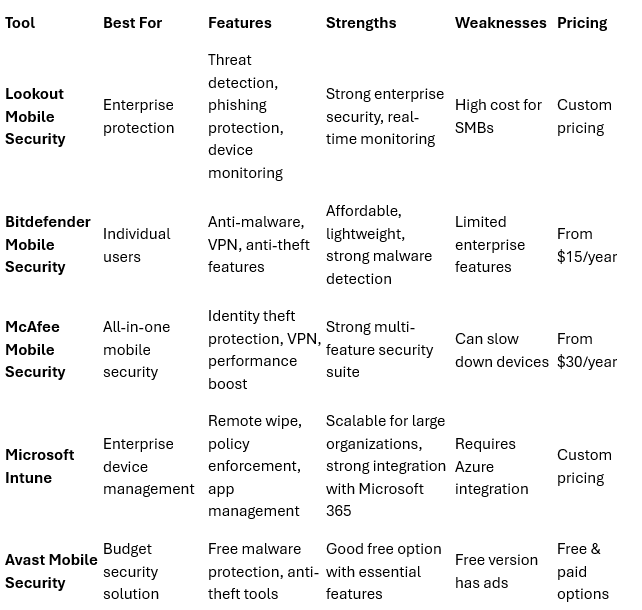
Best Mobile Security Solutions
How to Choose the Right Mobile Security Solution
When selecting a mobile security solution, consider these factors:
Device Compatibility: Ensure the software works on iOS, Android, and other mobile platforms.
Threat Detection Capabilities: Look for real-time monitoring, anti-phishing, and malware scanning.
Ease of Use: Choose solutions that provide simple management and minimal performance impact.
Remote Management Features: Businesses should prioritize tools that offer remote wipe and mobile device management (MDM).
Compliance Requirements: Ensure the solution meets GDPR, HIPAA, and PCI-DSS security standards.
Cost & Licensing: Compare subscription vs. one-time purchase models to align with your budget.
Step-by-Step Guide to Implementing Mobile Device Security
Selecting the right mobile security solution requires careful evaluation of security needs, compliance requirements, and usability. The best choice depends on whether the solution is intended for individual users, small businesses, or large enterprises, as well as the type of data being protected and the threats most relevant to your industry.
Key Factors to Consider
1. Device Compatibility
Ensure the solution supports iOS, Android, and other mobile platforms.
Verify if the tool is optimized for smartphones, tablets, and other connected devices.
Cross-check whether it integrates seamlessly with existing enterprise security solutions.
2. Threat Detection & Prevention Capabilities
Choose solutions with real-time malware scanning, anti-phishing protection, and network security monitoring.
Look for security tools that use AI-powered threat detection to identify and respond to emerging cyber threats.
Ensure the solution provides behavioral analysis to detect anomalies in device activity.
3. Authentication & Access Control Features
Solutions should offer multi-factor authentication (MFA), biometric login options, and strong password enforcement.
Organizations should consider Zero Trust security models that require identity verification before granting access.
Tip: Implement role-based access control (RBAC) to limit access to sensitive data on mobile devices.
4. Remote Management & Data Protection
For Businesses: Choose solutions with Mobile Device Management (MDM) or Enterprise Mobility Management (EMM) capabilities.
For Individuals: Opt for apps that provide remote wipe and anti-theft tracking.
Features such as data encryption, secure cloud backups, and remote access monitoring help protect against device loss or theft.
5. Ease of Use & System Performance
Security software should be easy to configure and manage, even for non-technical users.
Consider solutions with low resource consumption to avoid slowing down mobile devices.
Tip: Read customer reviews to identify solutions that offer user-friendly interfaces and responsive customer support.
6. Compliance with Regulatory Requirements
Ensure that the tool adheres to GDPR, HIPAA, PCI-DSS, and CCPA security regulations.
Highly regulated industries (e.g., finance, healthcare) should prioritize tools with compliance reporting features.
Tip: Some enterprise security solutions offer audit logs and compliance reports to streamline regulatory adherence.
7. Cost & Licensing Model
Compare pricing models such as subscription-based, per-device pricing, or enterprise-wide licensing.
Factor in long-term costs for software updates, technical support, and scalability.
Tip: Free or open-source mobile security solutions may work for basic security needs, but businesses should invest in premium solutions for robust protection.
Who Should Be Involved in the Selection Process?
For organizations, selecting the right mobile security solution should involve:
IT & Security Teams – To assess technical capabilities, threat coverage, and integration with existing security infrastructure.
Compliance & Legal Teams – To ensure regulatory adherence and avoid legal penalties.
Finance & Procurement Teams – To evaluate costs and budget considerations.
End-Users (Employees) – To ensure usability and adoption of security best practices.
Common Mistakes to Avoid When Choosing a Mobile Security Solution
❌ Ignoring Device Compatibility – Ensure your chosen solution supports all mobile platforms used in your organization.
❌ Overlooking User Experience – Complicated security tools may lead to poor adoption and increased security risks.
❌ Neglecting Future Scalability – A solution that works today should also adapt to growing mobile security needs.
❌ Relying Solely on Antivirus Software – Comprehensive security requires multiple layers of protection, including authentication, encryption, and mobile threat defense.
Final Thought
The best mobile security solution should offer a balance between security, usability, and scalability. Whether you're securing personal devices or an entire enterprise network, prioritizing strong authentication, real-time threat detection, and compliance with industry standards will help mitigate mobile security risks effectively.
When selecting a mobile security solution, consider these factors:
Device Compatibility: Ensure the software works on iOS, Android, and other mobile platforms.
Threat Detection Capabilities: Look for real-time monitoring, anti-phishing, and malware scanning.
Ease of Use: Choose solutions that provide simple management and minimal performance impact.
Remote Management Features: Businesses should prioritize tools that offer remote wipe and mobile device management (MDM).
Compliance Requirements: Ensure the solution meets GDPR, HIPAA, and PCI-DSS security standards.
Cost & Licensing: Compare subscription vs. one-time purchase models to align with your budget.